 FloServer
The projects window
Everything you do day to day happens here: every project, whether it's running, and what it uses.
At a glance
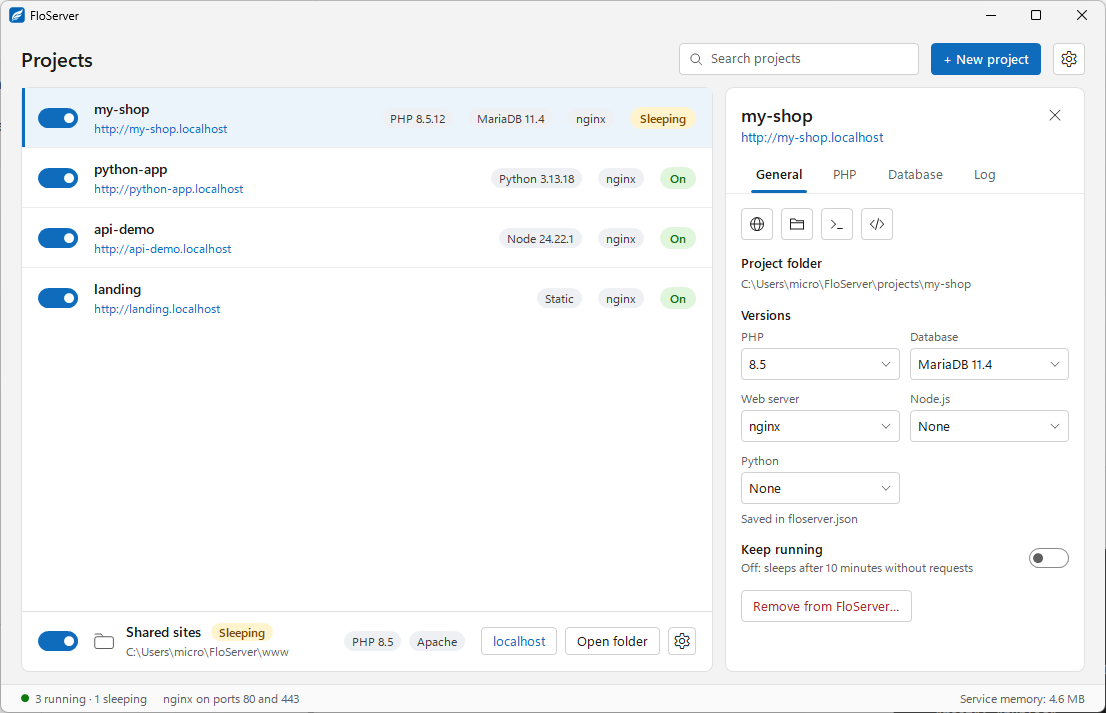
- 1. Switch: Turn a project on or off.
- 2. Address: Open the project in your browser at its .localhost address.
- 3. Versions: What the project uses, such as PHP 8.5.12, MariaDB 11.4 and nginx.
- 4. State: On, Sleeping (no requests for a while; it wakes on the next one), or Off.
- 5. New project: Start from a template, an existing folder or a backup. See Create a project.
- 6. Settings: Runtimes, PHP, Ports & HTTPS, Database, Apache, Folders, Shared sites and General. See Settings.
- 7. Shared sites: Every folder in the www folder at localhost, like htdocs. See Shared sites.
- 8. Status bar: How many projects are running and sleeping, and the web server's ports.
- 9. Service memory: What FloServer's background service is using right now.
Project states
A project that gets no requests goes to sleep and wakes on the next request, so projects you aren’t using cost almost nothing. Turn a project off with its switch to stop it completely.
A project that needs a runtime you haven’t installed says so in the list and offers to download it.
Next
Click a project to open its panel, or right-click it for the project menu.
Docs for FloServer 0.1.0Something wrong on this page? Email us