 FloServer
Project panel
Click a project in the list to open its panel on the right. Close it with the ✕ at its top right.
The General tab
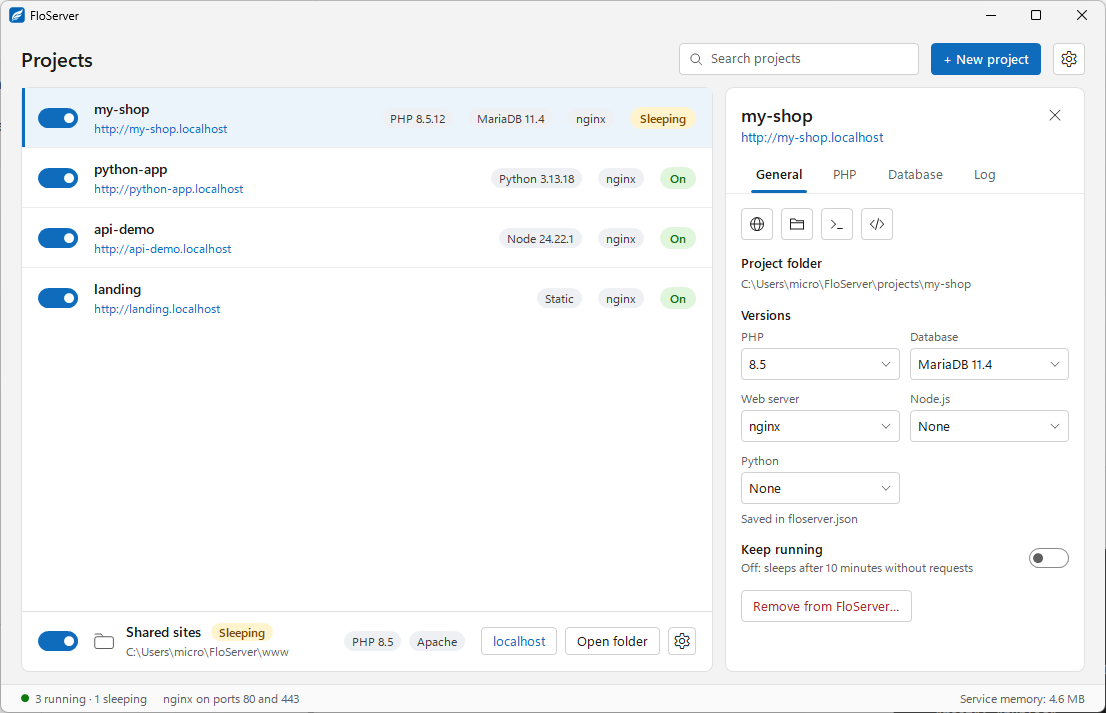
- 1. Tabs: General, PHP, Database and Log. A project only shows the tabs it uses: a Python app without a database has General and Log.
- 2. Quick buttons: Open in browser, open the folder, open a terminal, open in your code editor.
- 3. Project folder: Where the project's files are.
- 4. Versions: PHP, Database, Web server, Node.js and Python. Saved in floserver.json.
- 5. Keep running: Off: the project sleeps after 10 minutes without requests. Turn it on for a project that must stay awake, such as one with background jobs.
- 6. Remove from FloServer…: Forget the project in FloServer.
The PHP tab
This project’s own PHP extensions and php.ini values, on top of the defaults for its PHP version in Settings → PHP. They’re kept in its floserver.json.
The Database tab
The project’s own database and user. See Databases and phpMyAdmin.
The Log tab
Requests and messages from the project as they come in.
Docs for FloServer 0.1.0Something wrong on this page? Email us